Jev by TypeSafe AI: the fast AI model we're bringing into our operations
Jev is TypeSafe AI's new System One model. It picks answers from a list you define, fast. Here is what it is, how it differs from an LLM, and where we use it.
TypeSafe AI released a new kind of AI model on 15 September 2026. It is called Jev. It does not chat and it does not write text. It makes decisions.
We are working on bringing Jev into every step of our operations, inside the company second brain we run the studio from. The goal is simple: the small decisions that sit between steps get made faster, so client work moves faster. This post covers what Jev is, how it differs from the large language models most teams already use, and where it fits in a studio like ours.

Image: TypeSafe AI
What is Jev?
Jev is the first model in what TypeSafe calls a new class: System One models. The name comes from Daniel Kahneman's book Thinking, Fast and Slow. System 1 is fast, intuitive thinking. System 2 is slow, careful reasoning. Jev is built for the fast kind.
You give Jev some text or data and a question. You also give it the list of possible answers in advance. Jev returns one of those answers, with a probability and a confidence score attached. TypeSafe describes it as "a frontier-intelligence function call: unstructured state in, typed probabilistic decisions out."
The model is named after William Stanley Jevons, the economist who noticed that cheaper coal led to more coal use, not less. TypeSafe expects the same with AI: every big drop in cost opens up many more uses.
TypeSafe was founded by Diogo Almeida. In the announcement he writes that at OpenAI he helped build the methods behind ChatGPT, and that over time it became clear to him that chat models were missing something big.
Jev vs an LLM: what is different
A large language model writes one word at a time. The output is text, and text can be anything: an answer, code, a refusal, or a made-up fact. If software needs to use that output, someone has to parse it and check it first.
Jev works the other way round:
- The possible outputs are defined before the call. Jev can only return a value that fits.
- It returns all its outputs in one pass instead of word by word. TypeSafe says this is what makes it so fast.
- Every answer comes with a probability, so your code can decide what to do when Jev is unsure.
- It is trained with a method TypeSafe calls Reinforcement Learning for Calibrated Decisions (RLCD). The aim is honest probabilities, not answers that people like reading.
The trade is clear. Jev gives up writing text. In return, TypeSafe says it never produces a type error, because the answer always matches the format you asked for.
TypeSafe's side-by-side demo video shows the difference. The language model builds its answer word by word. Jev returns every option's probability at once.
Watch the side-by-side demo in TypeSafe's announcement.
What TypeSafe says about speed and cost
These are TypeSafe's numbers, not ours. They publish the details on their workflow evals site so anyone can check them.
The chart below is the one that caught our eye. It averages four of their workflows. Each dot is a model, placed by accuracy (up) and cost per workflow (right is more expensive, on a log scale). Jev sits at the far left, at about the same accuracy as models that cost far more per run.
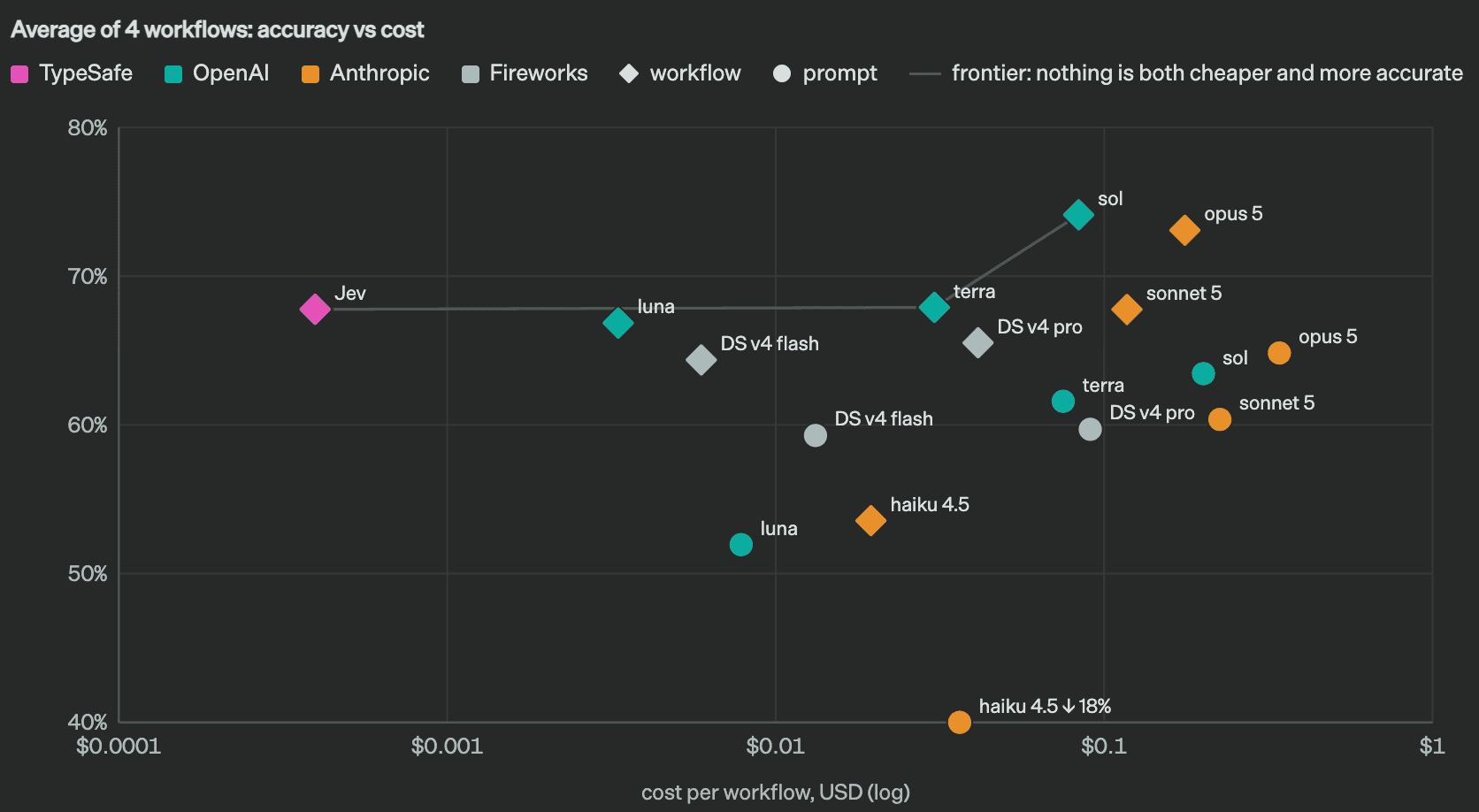
Chart: TypeSafe AI
- A full response takes 70 to 500 milliseconds.
- On System One tasks, Jev is 40 to 200 times faster than frontier models.
- Their headline figures, 193.6 times faster and 444.6 times cheaper, come from their workflow evals. TypeSafe says these are "on the higher end of real world gains."
TypeSafe is also open about the limits of its evidence. The service currently runs from the US West Coast, and most of their tests ran from their own laptops there. They say they cannot yet prove their pricing is not subsidized. And the workflows in their tests were written by their own team, so some bias is possible.
The workflows themselves are worth a look, because they show what a System One task really is. This is the simplest of the four: a security alert handled in four stages. Each stage asks Jev small typed questions (yes or no, a score, or a choice from a list), and plain code turns the answers into an action.
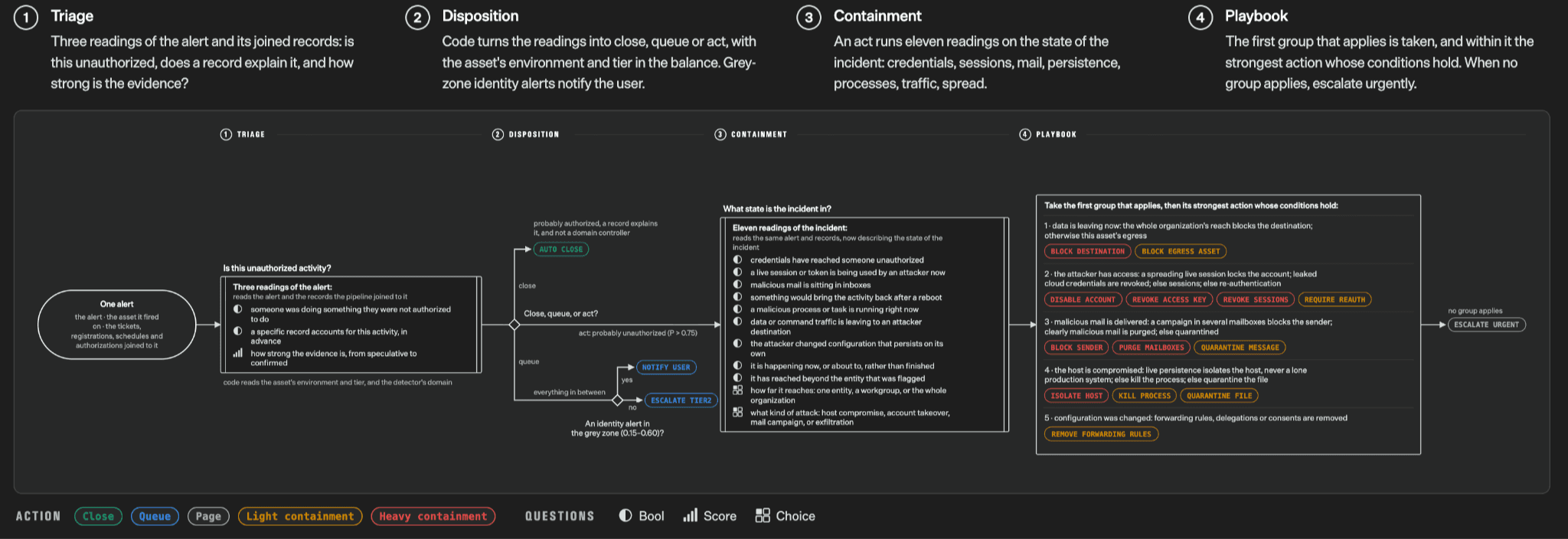
Diagram: TypeSafe AI
This is the pattern we are copying in our own operations: break a decision into small questions, let the model answer them, and let code decide what happens next.
We like that they say this out loud. It makes the rest easier to trust.
What TypeSafe built with it
TypeSafe also shared two demos that show how fast the answers come back.
In the first, Jev plays Doom. It reads the game state and picks the next move, ten times a second. TypeSafe says this costs about $7 an hour.
Watch Jev play Doom in TypeSafe's announcement.
In the second, Jev plays the Wikipedia game: start on one page and reach another using only the links on each page. Every step means picking one link out of hundreds or thousands. One wrong pick sends the whole run off course, so this is a good test of a model that cannot make up a link.
Watch Jev play the Wikipedia game in TypeSafe's announcement.
Where Jev fits in our operations
Most of the work in running a software studio is not writing code. It is the steps around it. A request comes in and someone decides which team owns it. An email arrives and someone decides whether it is a new lead. A support ticket opens and someone decides which department it goes to. A task lands in a sprint and someone decides whether it is clear enough to estimate.
Each of these is a choice from a short, fixed list. That is exactly the kind of question Jev is built for.
Our company second brain already holds our clients, projects, decisions and follow-ups in one place. We are working on putting Jev at each of these decision points inside it. The answer comes back in under a second, with a confidence score. When Jev is confident, the work moves on. When it is unsure, a person decides.
For our clients this means less time waiting between steps. A request reaches the right person sooner, and the people on our team spend their time on the work itself.
What Jev is not for
Jev does not write. It will not draft an email, a proposal or code. For that you still need a language model.
TypeSafe also says Jev "can't hallucinate", because it can only return answers from your list. That is true for the format. It does not mean the choice is always right. Jev can still pick the wrong option from the list, which is why the probability matters and why we keep a person on the unsure cases.
TypeSafe's own chart makes the format point clearly. Jev's error rate is zero because a wrong format is impossible, not because they measured it. The language model figures come from OpenRouter traffic, which TypeSafe notes may be biased.
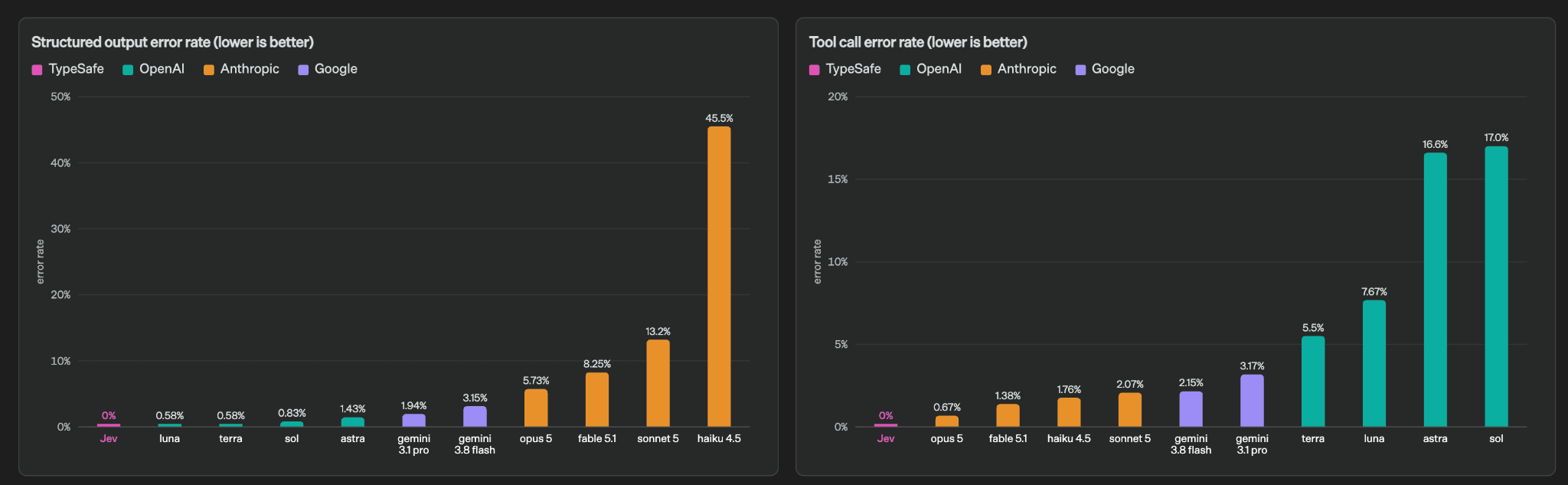
Chart: TypeSafe AI
How to try Jev
Jev is in early access. TypeSafe is moving developers off the waitlist in batches. You can sign up at typesafe.ai, and the documentation shows how to define the answers you want back. Their full announcement, with the charts and the evals, is Introducing System One Models & Jev.
We try new AI tools early on our own work before we bring them to clients. We did the same with WebMCP on our contact forms. Once Jev is running across our operations, we will share what we measured.