Shadow AI: Your Team Already Uses AI. Now Make It a System.
Shadow AI means your team uses AI at work without the company knowing. Banning it fails. Here is why it is a signal, and how to turn it into a system.
Ask a manager whether their team uses AI and you usually hear "a little" or "we are looking into it." Ask the team and you hear something else. They use it every day, on personal accounts, for real work.
That gap has a name. It is called shadow AI.
What shadow AI is
Shadow AI is AI that people use at work without the company knowing about it or approving it. A personal ChatGPT account used to draft client emails. A free transcription app running in sales calls. A contract pasted into a chatbot to get a summary before a meeting.
None of this is unusual. In the 2024 Work Trend Index from Microsoft and LinkedIn, which surveyed 31,000 people in 31 countries, 78% of people using AI at work said they bring their own AI tools. The company did not choose them. The employee did.
It also has a cost. IBM's Cost of a Data Breach Report 2025 found that one in five of the organizations it studied had a breach linked to shadow AI. Those breaches added as much as USD 670,000 to the average cost. And 63% of the breached organizations had no AI governance policy at all.
So the risk is real. But I think most companies are drawing the wrong conclusion from it.
Shadow AI is a signal, not the problem
When your people use AI without being asked, they are telling you something. They already decided it is worth it. They found the use cases and built the habit on their own, without a budget or a plan from anyone.
That is the hardest part of AI adoption, and they did it for free.
The problem is not that they use AI. The problem is how it happens: one person at a time, with no shared rules and nobody able to see what goes in or what comes out. Client data ends up in personal accounts. Good prompts stay in one person's chat history. When that person leaves, the know-how leaves with them.
Why banning it does not work
The first reaction I see is a ban. Block the websites, send a memo, move on.
It does not hold. People keep using AI, just on their phones, where you can see even less. You lose the visibility, and you lose the gains your team was already getting. The work gets slower and the risk stays.
The second reaction is to buy licences for everyone and call it done. I wrote about this earlier in the year: AI enablement is not a purchase. A licence nobody is trained on sits unused, and the personal accounts carry on next to it.
Approved use is not the same as a system
Earlier this year I spoke with a fintech company in the region where AI was not hidden at all. It was company policy. Developers worked with Claude. Marketing produced content and video with AI tools. The product team had AI in its daily work.
They did not ask us to help them adopt AI. They were past that. They asked how to become, in their words, "more systemized with AI implementation."
That stayed with me, because it is where every company ends up once shadow AI comes into the open. Approval alone does not fix it. If each person prompts differently, works from their own notes and checks results in their own way, you still cannot compare the output, reuse what works or see where it goes wrong. You have approved shadow AI.
The job is not adoption. Your team already adopted. The job is turning many personal habits into one company system. That is what I mean by AI enablement.
How to turn shadow AI into a system
This is roughly how we approach it with clients. None of it needs a big platform.
1. Ask what people already use, and promise no one gets in trouble
Start with an honest list. Which tools, for which tasks, with which data. Make it an amnesty, not an audit. If people think the list will be used against them, you will get a short list and the real use stays hidden.
This list is also your best map of where AI already saves time. Most of the use cases you need are on it.
2. Choose the approved tools and put them where the work happens
Pick a small set of tools with business accounts and proper data controls. Then set them up inside the systems your team already uses: email, documents, the CRM, the project tool. A tool that lives in a separate tab loses to the personal account that is already open.
3. Write the rules on one page
An AI acceptable use policy does not need to be a legal document. One page people will actually read beats twenty pages nobody opens. It should answer three questions. What data never goes into an AI tool. What output needs a human check before it leaves the company. Who to ask when someone is not sure.
4. Give AI the company's knowledge, not each person's
This is the step most companies skip, and it is where the gap between people closes. When AI can reach the company's own documents, decisions, templates and past work, everyone gets answers from the same source. A new hire gets the same quality of answer as someone who has been there five years.
We run our own studio this way, from a shared company knowledge base that our AI tools read from.
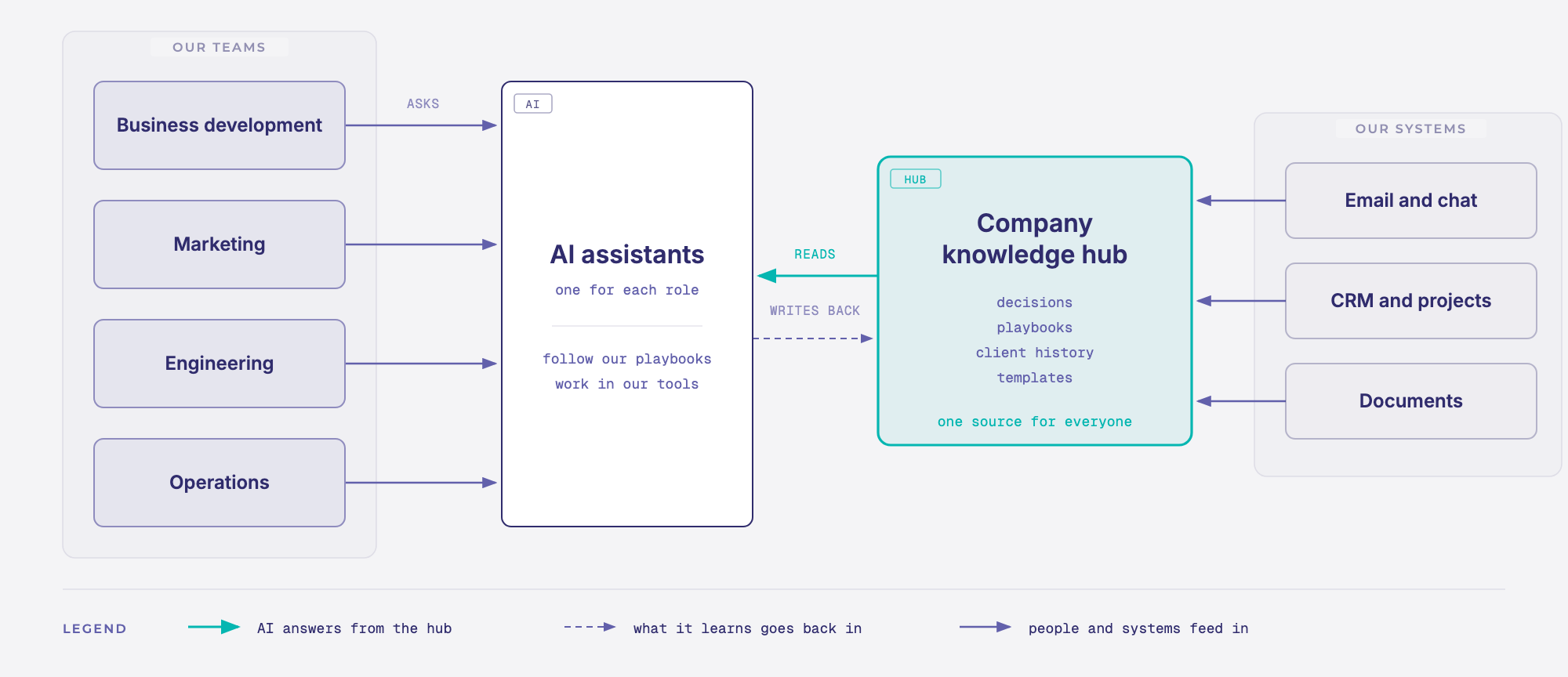
How we connect every team at WeTheMakers to one hub.
5. Train every role, then keep watching
AI literacy is not one workshop for the whole company. A lawyer, an accountant and a developer use AI for different things and make different mistakes with it. Train each role on its own work.
Then keep an eye on it. Which tools are used, for what, and where the output goes wrong. This is what AI governance looks like in practice. It is not a committee. It is knowing what is happening and fixing it as you go.
Why this matters more every month
Until now, shadow AI meant a person typing into a chatbot. That is changing.
Microsoft is previewing an agent called Autopilot inside Microsoft Copilot through its Frontier program. According to Microsoft's own documentation, Autopilot is an always-on agent with its own workplace identity, memory and workspace, including its own mailbox and calendar. It can run scheduled work while your device is off. Microsoft also says it does not expand the data you can access, which is the right design.
But it shows where this is going. AI will not only answer when asked. It will act on its own, inside your company, on work your people hand to it. If a company cannot see how its team uses a chatbot today, it will not see what an agent does next year. The rules and the visibility need to be in place before that happens.
Where to start this week
You do not need a strategy deck to begin. Three things you can do in a week:
- Ask your team, with the amnesty, what AI they use and for what.
- Write the one-page rule on what data never goes in.
- Pick the two or three tasks on that list that take the most hours, and set them up properly first.
If you want help with the rest, this is the work we do in AI Enablement and Automation. We start with an AI readiness assessment of how your team uses AI today, then set up the tools, the knowledge and the training for each role, and stay on to support it.
Your team already chose AI. Give them a system to use it in.